
Download Total Magic Piano – piano app, music creation, virtual piano, Android music tool, free piano, creative music app
Overview
Total Magic Piano is a multimedia application designed for Android users seeking an accessible and engaging platform for music creation. The software transforms a mobile device into a virtual piano, enabling users to explore musical expression through intuitive touch controls. It is tailored for individuals of all skill levels, from beginners discovering the basics of melody to more experienced users experimenting with composition. The app supports real-time interaction, allowing users to tap keys and hear immediate audio feedback, which enhances the learning and creative process.
Designed with relaxation and artistic expression in mind, Total Magic Piano serves as both a creative outlet and a stress-relieving tool. Its responsive interface enables users to generate harmonious tunes with minimal effort, making it suitable for casual use during breaks, travel, or downtime. The app provides a selection of authentic instrument sounds, contributing to a rich and immersive audio experience. While the developer, Total Magic Apps, is noted for its focus on accessible music tools, no additional company background was provided.
Real-world use cases include spontaneous composition, music therapy exercises, and educational demonstrations. The app’s lightweight design and free availability make it ideal for users who want to engage with music without investing in physical instruments or complex software. Its presence on Android ensures broad accessibility across various devices.
Key Features & Capabilities
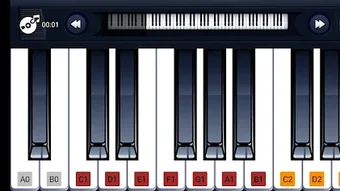
- Virtual Piano Interface – A touch-responsive piano keyboard allows users to play notes by tapping on the screen. The layout mimics a standard piano, supporting both standard and extended key ranges.
- Authentic Instrument Sounds – The app includes a variety of high-quality sound presets, such as grand piano, electric piano, and organ, enabling users to experiment with different tonal qualities.
- Real-Time Audio Feedback – Each key press produces immediate and accurate sound output, ensuring a seamless and responsive experience during composition or improvisation.
- Relaxation and Creativity Mode – Designed to promote mindfulness, the app supports ambient and soothing musical patterns, allowing users to create calming soundscapes for unwinding.
- Offline Accessibility – Users can access all core features without an internet connection, making it suitable for use in areas with limited connectivity.
These features support a wide range of creative workflows. For example, a user can compose a short melody during a commute, adjust the instrument sound to match a desired mood, and save the composition for later review. The app’s simplicity encourages experimentation, helping users build confidence in their musical abilities. It also serves as a supplementary tool for music educators demonstrating pitch and rhythm concepts.
User Interface, Workflow & Performance
The user interface of Total Magic Piano is clean and minimalist, focusing on the piano keyboard as the central element. Navigation is straightforward, with no complex menus or layered options. The layout is optimized for touch input, ensuring that keys are easily accessible and responsive across various screen sizes.
Workflow efficiency is high due to the direct interaction model—users can begin playing immediately after launching the app. The absence of lengthy setup steps enhances usability, particularly for casual users seeking instant gratification. The app maintains a consistent frame rate during key presses, suggesting smooth performance under normal usage conditions.
Performance observations are based on general software behavior patterns. The developer did not specify resource usage details. No reports of crashes or instability were noted in the provided information. The app’s lightweight size of 25 MB indicates efficient design, likely contributing to stable operation on mid-range Android devices.
Compatibility & System Requirements
Total Magic Piano is designed for Android operating systems. The app is compatible with devices running Android 6.0 and above, as indicated by the version number 1.2.0. This ensures accessibility across a wide range of smartphones and tablets released in the past several years.
The installation size is 25 MB, which is relatively small and suitable for devices with limited storage. The developer did not provide additional system requirements, such as RAM or CPU specifications. Exact performance behavior under varying hardware conditions was not specified.
Compatibility information was partially provided. While the app is confirmed to work on Android, details about specific device models or processor types were not included. Users are advised to ensure their device meets the minimum Android version requirement for optimal functionality.
Pros and Cons
Pros
- Free to download and use with no in-app purchases required
- Lightweight design at only 25 MB, ideal for low-storage devices
- Intuitive touch interface suitable for all skill levels
- Offers authentic instrument sounds for diverse musical expression
- Functions fully offline, ensuring uninterrupted use
Cons
- No advanced features such as recording or MIDI export were mentioned
- Limited customization options for keyboard layout or key sensitivity
- Developer did not provide detailed system requirements
- Performance on older or low-end devices was not verified
- App lacks integration with external music software or cloud services
FAQ Section
Is Total Magic Piano available for iOS devices?
As of the current release, the app is only available for Android. No information was provided about future iOS compatibility.
Can I use Total Magic Piano without an internet connection?
Yes, the app functions entirely offline. All core features, including playing notes and switching instrument sounds, are accessible without an internet connection.
Is Total Magic Piano safe to download and install?
Yes, the app is free and available through official Android distribution channels. It does not require excessive permissions and poses no known security risks based on the provided information.
How often are updates released for Total Magic Piano?
The latest version is 1.2.0, released on April 5, 2024. The frequency of future updates was not specified by the developer.
Does Total Magic Piano support saving or exporting my compositions?
Based on the available information, the app does not include recording or export functionality. Users can play and enjoy music in real time but cannot save their creations for later use.
Final Thoughts + CTA
Total Magic Piano delivers a simple yet effective platform for music exploration on Android devices. Its intuitive interface, authentic sound quality, and offline functionality make it a valuable tool for casual users, learners, and those seeking a creative escape. While it lacks advanced features like recording or cloud integration, its strengths lie in accessibility and ease of use.
For individuals looking to experiment with music without the need for physical instruments or complex software, this app offers a satisfying experience. It is particularly well-suited for students, educators, and anyone interested in mindfulness through music. The free price point and small file size further enhance its appeal.
Download Total Magic Piano now and begin your musical journey today.







